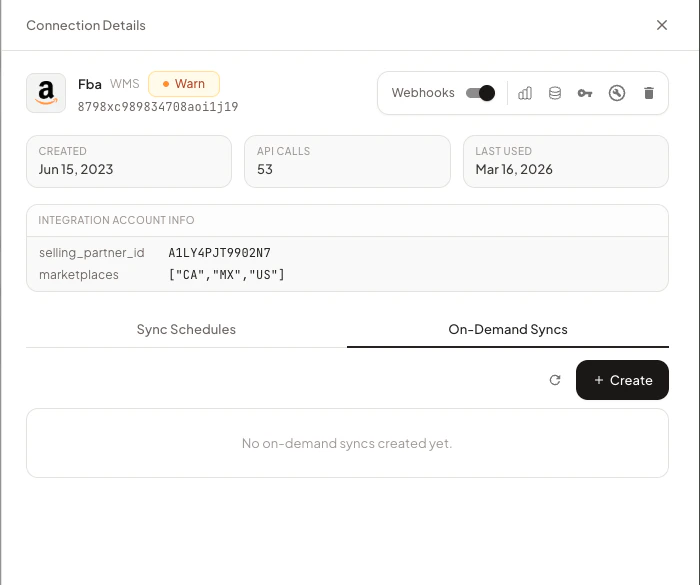
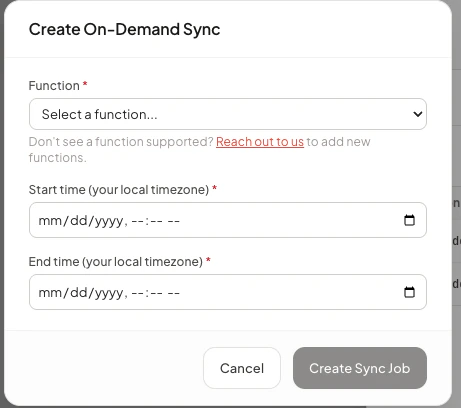
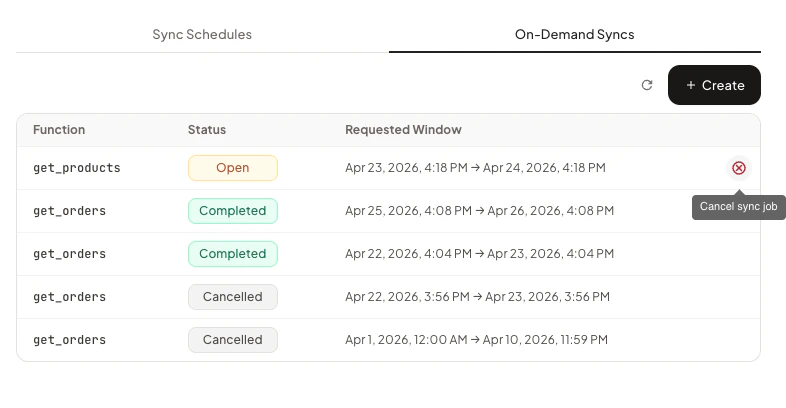
On-demand syncs let you trigger a backfill of a specific data type over a custom time window, outside of Trackstar’s normal sync schedule. They’re useful for re-syncing historical data or pulling a longer window of data than the default 30-day initial sync. For information about Trackstar’s normal scheduled syncs, see Syncing Data.

Supported Integrations and Functions

Support is rolled out per integration + function. If you’d like support added for an integration or function, reach out to us and we’ll look into enabling it. This list is regularly updated as we enable on-demand syncs for more integrations.

WMS

Available function names:
  • get_products
  • get_orders
  • get_inbound_shipments
  • get_returns
  • get_bills
  • get_inventory_ledger
get_inventory is intentionally not supported for on-demand syncs. Inventory syncs always fetch a full snapshot from the integration regardless of the time window, so an on-demand sync over a custom range would not change what gets pulled. To refresh inventory, use POST /connections/{id}/sync or wait for the next scheduled sync.
Currently supported integrations and functions:
  • Amazonget_orders, get_returns, get_products, get_bills, get_inventory_ledger
  • Bergenget_orders, get_inbound_shipments
  • Bleckmannget_orders, get_inbound_shipments, get_returns
  • BlueBoxget_returns
  • Byrdget_orders, get_inbound_shipments, get_returns
  • Camelotget_orders, get_inbound_shipments
  • Canary7get_orders, get_inbound_shipments, get_returns
  • Carton Cloudget_orders
  • Cirroget_orders, get_products
  • Craftyget_orders, get_inbound_shipments
  • Davinciget_orders, get_inbound_shipments, get_returns
  • DCLget_orders
  • Deposcoget_bills, get_inventory_ledger
  • Extensiv 3PL Centralget_orders, get_inbound_shipments, get_returns, get_products, get_inventory_ledger
  • FedEx Fulfillmentget_orders
  • FFEget_orders, get_inbound_shipments, get_returns
  • Finaleget_orders, get_inbound_shipments, get_returns
  • Fulfillmentget_orders, get_returns
  • Fulfillment Labget_orders
  • Helm WMSget_inbound_shipments
  • i-Fulfilmentget_orders
  • Infoplusget_orders, get_inbound_shipments, get_returns, get_products, get_bills
  • Jazz Centralget_orders
  • Leanafyget_inbound_shipments
  • Linnworksget_orders
  • Logicpodget_orders
  • Logiwaget_orders, get_inbound_shipments, get_returns, get_products, get_bills, get_inventory_ledger
  • Logiwa.ioget_orders, get_inbound_shipments
  • Maypleget_orders
  • Nimbleget_orders, get_inbound_shipments, get_returns, get_products
  • NFIget_orders
  • OSA Commerceget_orders, get_inbound_shipments, get_returns, get_products
  • Packemget_orders
  • Packiyoget_orders, get_returns, get_products
  • Rush Orderget_orders, get_inbound_shipments, get_returns
  • Salesupplyget_orders
  • ShipBobget_orders
  • ShipHeroget_orders, get_inbound_shipments, get_products, get_inventory_ledger
  • Shipping Treeget_inbound_shipments
  • ShipStationget_orders
  • ShipStreamget_inbound_shipments, get_returns
  • Skulabsget_orders
  • SkyVaultget_orders
  • Smart Warehousingget_orders
  • Sojoget_orders, get_inbound_shipments
  • Stordget_orders, get_inbound_shipments
  • TikTokget_orders
  • Vertical Coldget_orders, get_inbound_shipments
  • Walmartget_orders, get_returns
  • Warehanceget_orders, get_products
  • Whiplashget_orders
  • Xorosoftget_orders, get_inbound_shipments

Carrier

Available function names:
  • get_invoice_line_items
Currently supported integrations and functions:
  • DHL Expressget_invoice_line_items
  • DPDget_invoice_line_items
  • FedExget_invoice_line_items
  • Royal Mailget_invoice_line_items
  • UPSget_invoice_line_items
  • USPSget_invoice_line_items

Cart

On-demand syncs are not currently enabled for any Cart integrations.

Usage

There are three endpoints for managing on-demand syncs:
OperationMethodPath
Create a sync jobPOST/connections/on-demand-syncs
Get sync job statusGET/connections/on-demand-syncs/{sync_job_id}
Cancel a sync jobPOST/connections/on-demand-syncs/{sync_job_id}/cancel
Like all Trackstar API calls, you’ll need to authenticate using your API key and the access token for the specific connection. You can manage on-demand syncs either through the API directly or through the Trackstar dashboard. Each section below shows both options — pick whichever fits your workflow.

Creating a Sync Job

Request Parameters

The following parameters are required when creating a sync job via the API:
start_time
string
required
ISO 8601 timestamp marking the start of the time window to sync (e.g., 2025-12-01T00:00:00Z).
end_time
string
required
ISO 8601 timestamp marking the end of the time window to sync (e.g., 2026-01-01T00:00:00Z).
function_name
string
required
The data-fetching function to run. Must be one of the values listed in Supported Functions.
If you attempt to start an on-demand sync for an integration + function combination that isn’t currently enabled, you will receive a 400 response with the message:
On-demand sync is not enabled for {integration_name} {function_name}
import requests

TRACKSTAR_API_KEY = "your_api_key"
ACCESS_TOKEN = "your_access_token"

url = "https://production.trackstarhq.com/connections/on-demand-syncs"
headers = {
    "x-trackstar-api-key": TRACKSTAR_API_KEY,
    "x-trackstar-access-token": ACCESS_TOKEN,
    "Content-Type": "application/json"
}

payload = {
    "start_time": "2025-12-01T00:00:00Z",
    "end_time": "2026-01-01T00:00:00Z",
    "function_name": "get_orders"
}

response = requests.post(url, headers=headers, json=payload)
response.raise_for_status()
sync_job = response.json()

print(sync_job)

Checking Sync Job Status

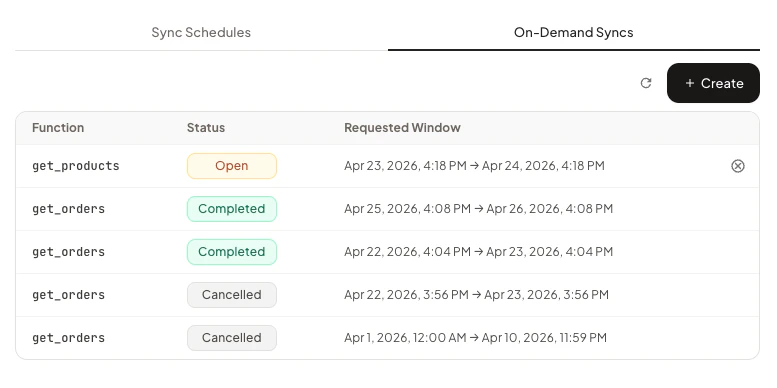
Use the sync_job_id returned from the create call to check progress. The response includes a status field with one of the following values:
StatusMeaning
openThe job has been created and is either queued or actively running.
completedThe job finished successfully. Synced data is now available via the standard Trackstar API.
cancelledThe job was cancelled before it could finish (see Cancelling a Sync Job).
A typical successful lifecycle is open → completed. A cancelled job follows open → cancelled. Only jobs in the open state can be cancelled. The full response also includes id, connection_id, function_name, requested_start_time, requested_end_time, and created_at.
Use the sync_job_id returned from the create call:
import requests

TRACKSTAR_API_KEY = "your_api_key"
ACCESS_TOKEN = "your_access_token"
SYNC_JOB_ID = "your_sync_job_id"

url = f"https://production.trackstarhq.com/connections/on-demand-syncs/{SYNC_JOB_ID}"
headers = {
    "x-trackstar-api-key": TRACKSTAR_API_KEY,
    "x-trackstar-access-token": ACCESS_TOKEN
}

response = requests.get(url, headers=headers)
response.raise_for_status()
status = response.json()

print(status)

Cancelling a Sync Job

If a sync job is no longer needed, you can cancel it before it completes. Only jobs in the open state can be cancelled.
import requests

TRACKSTAR_API_KEY = "your_api_key"
ACCESS_TOKEN = "your_access_token"
SYNC_JOB_ID = "your_sync_job_id"

url = f"https://production.trackstarhq.com/connections/on-demand-syncs/{SYNC_JOB_ID}/cancel"
headers = {
    "x-trackstar-api-key": TRACKSTAR_API_KEY,
    "x-trackstar-access-token": ACCESS_TOKEN,
    "Content-Type": "application/json"
}

response = requests.post(url, headers=headers)
response.raise_for_status()

print(response.json())

Important Notes

  • Asynchronous execution: Sync jobs run in the background. Poll the status endpoint or rely on Trackstar’s existing webhooks (e.g. order.created, order.updated) to know when new data has landed.
  • Precedence over scheduled syncs: On-demand syncs take precedence over scheduled syncs on the same connection. While a sync job is in the open state, the regularly scheduled syncs for that connection will not run, which can cause recent data to fall behind. Once all open sync jobs finish (or are cancelled), scheduled syncs automatically resume from where they left off — so no data is missed, only delayed.