> ## Documentation Index
> Fetch the complete documentation index at: https://docs.trackstarhq.com/llms.txt
> Use this file to discover all available pages before exploring further.
# Connection Issues
> Understanding and resolving connection errors
After a connection is created, Trackstar continuously monitors its health. Two types of issues can occur: **invalid credentials** and **missing permissions**. Understanding the difference is key to resolving them quickly.
## Types of Connection Issues
### Invalid Credentials (Blocking)
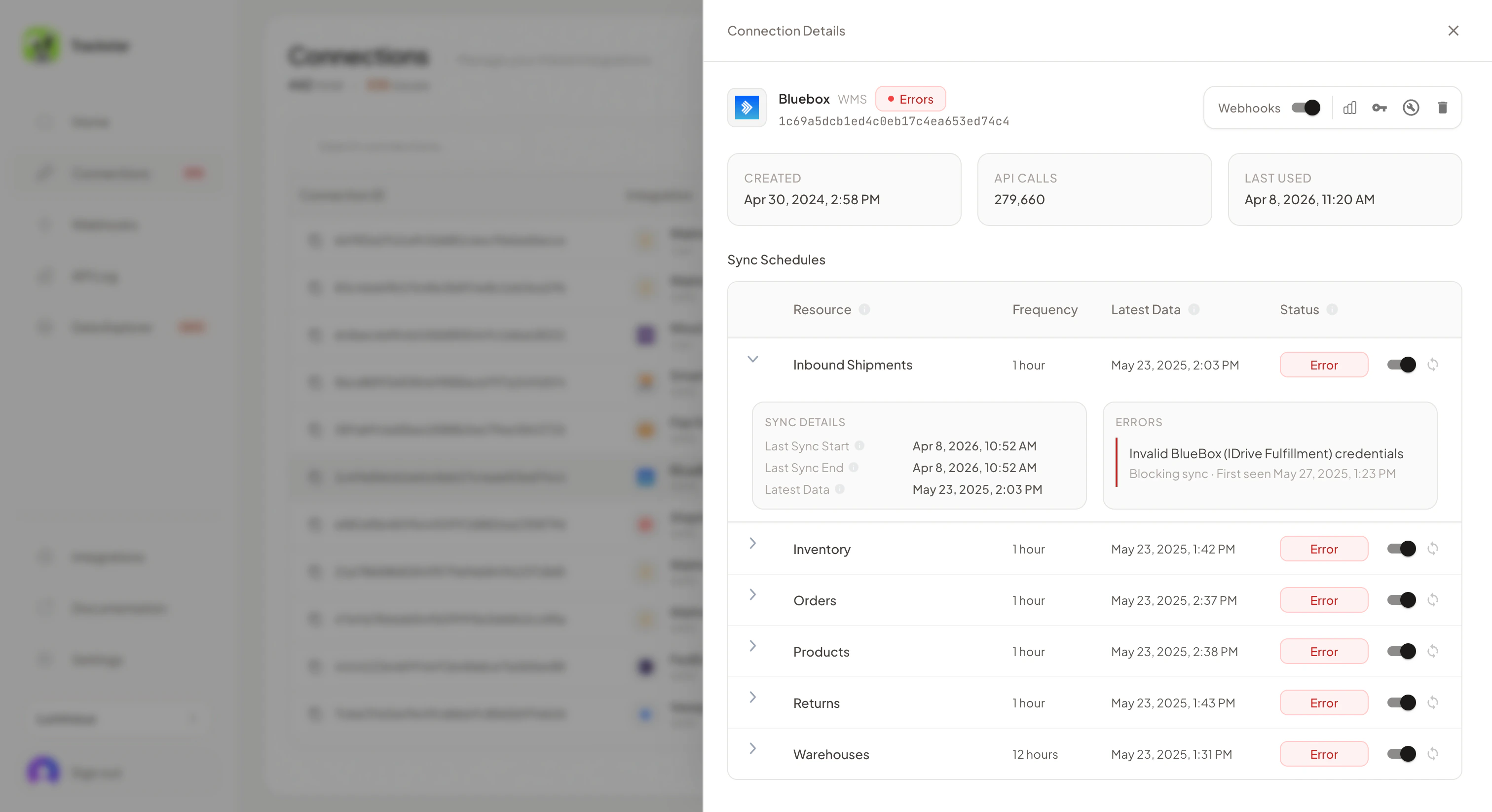
Invalid credential errors mean Trackstar can no longer authenticate with the connected system. This is a **blocking** issue — no data can be synced for any resource until the credentials are updated.
Common causes:
* Password or API key was rotated or expired
* Account was deactivated or suspended
* OAuth token was revoked
When this happens, the connection needs to be [reinstalled](#reinstalling-a-connection) with fresh credentials.
### Missing Permissions (Non-Blocking)
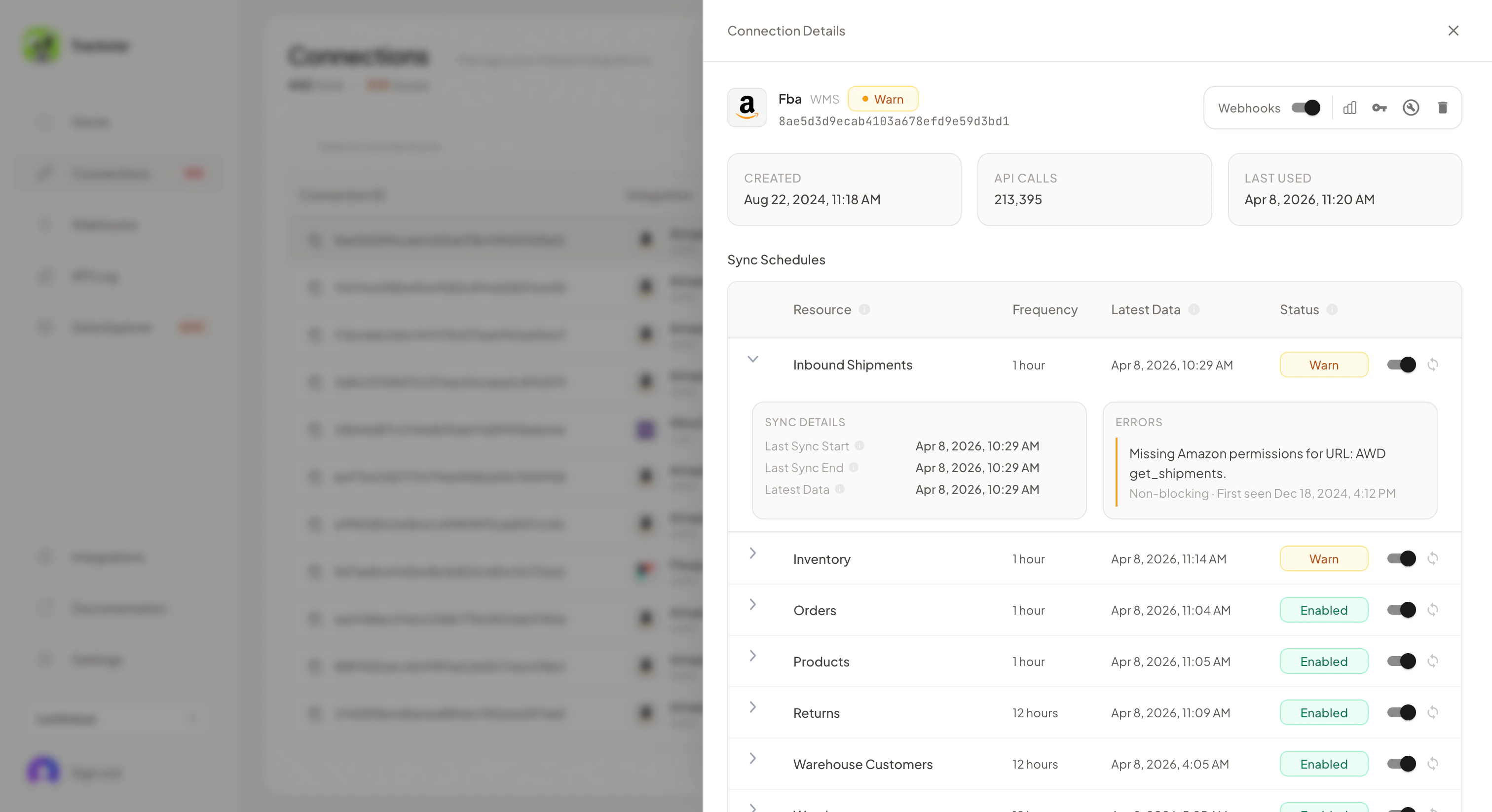
Permission errors mean the credentials are valid, but they don't have access to all supported resources. This is a **non-blocking** issue — the connection will continue to sync data for the resources it does have access to. Only the restricted resources are affected.
Common causes:
* API key has limited scope (e.g. read-only access, no access to returns)
* User role in the connected system doesn't include all modules
* Certain features are disabled or not part of the customer's plan
These can often be resolved by updating the user's role or permissions in the connected system, or by reinstalling with credentials that have broader access.
## How Issues Appear
### In the Dashboard
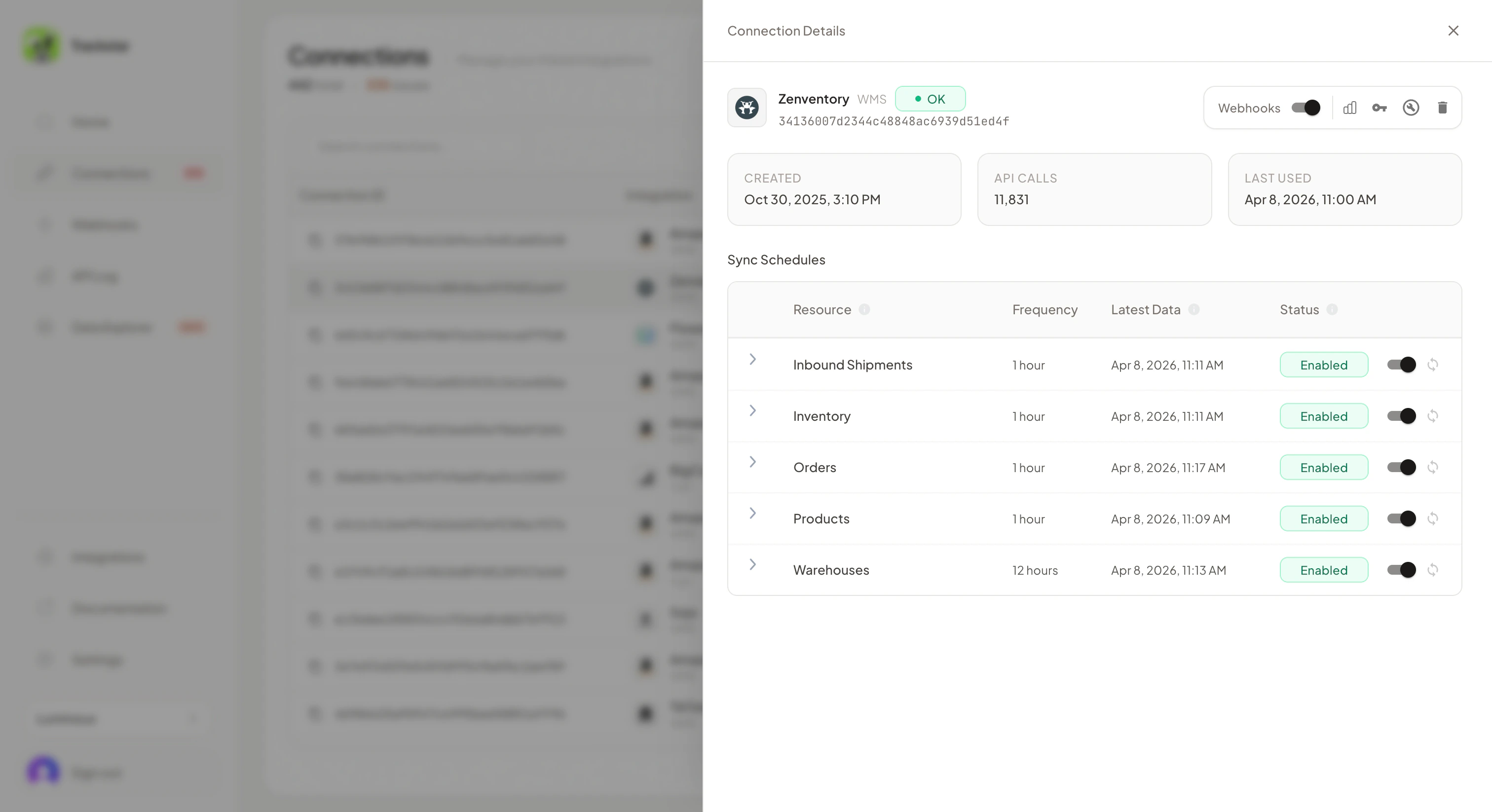
The [Connections page](https://dashboard.trackstarhq.com/connections) shows the health status of each connection. Click into a connection to see detailed error information, including whether issues are blocking or non-blocking, and which specific resources are affected.
A healthy connection with full permissions:
 A connection with invalid credentials shows a blocking error on every resource:
 A connection with missing permissions shows errors only on the affected resources:
 ### Via Webhooks
* `connection-error.created` — fired when a new error is detected (credential or permission)
* `connection-error.updated` — fired when an existing error changes
* `connection-error.deleted` — fired when an error is resolved (e.g. after reinstalling with updated credentials)
See the [webhooks documentation](/how-to-guides/webhooks) for more details.
### Via the API
The [GET /connections](/api-reference/mgmt/get-connections) endpoint returns a populated `errors` array when a connection has issues:
```json theme={null}
{
"data": {
"connection_id": "conn_abc123",
"integration_name": "some_integration",
"errors": [
{
"error_type": "invalid_credentials",
"resource": null,
"message": "The provided credentials are no longer valid."
}
]
}
}
```
For permission errors, the `resource` field indicates which specific resource is affected:
```json theme={null}
{
"errors": [
{
"error_type": "missing_permission",
"resource": "returns",
"message": "The provided credentials do not have access to returns data."
}
]
}
```
### Email Notifications
Trackstar can send email notifications when connection issues are detected. Configure email notification settings in the [dashboard](https://dashboard.trackstarhq.com/settings/notifications). This gives your team visibility into issues without needing to build webhook handling.
## Reinstalling a Connection
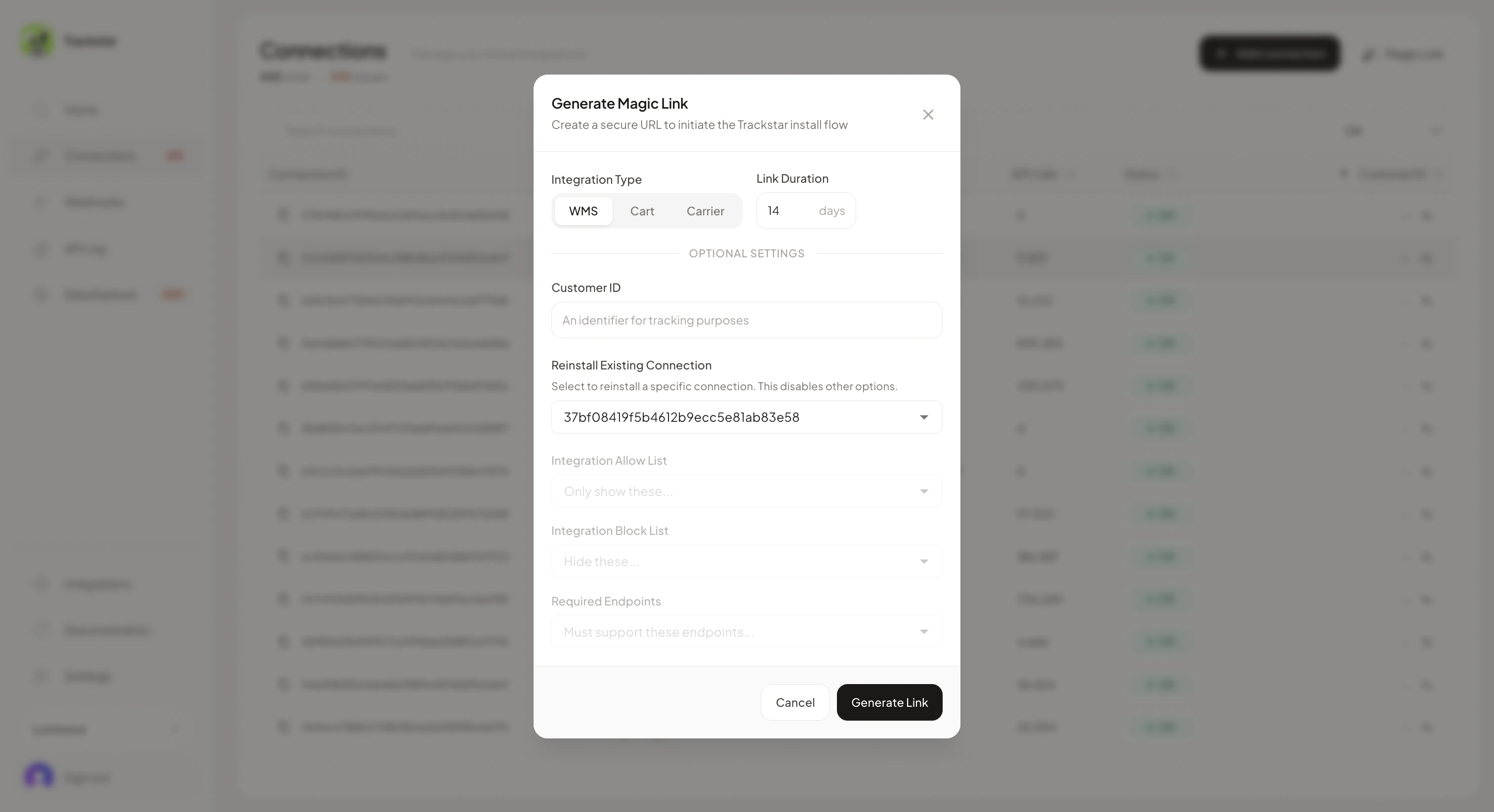
When credentials need to be updated, you can reinstall the connection. There are three ways:
* In the [Trackstar Dashboard](https://dashboard.trackstarhq.com/connections) by clicking the "Reinstall Connection" button within the connection row
* By generating a [magic link](/how-to-guides/trackstar-link#sending-a-magic-link) with the `Reinstall Existing Connection` field filled in
### Via Webhooks
* `connection-error.created` — fired when a new error is detected (credential or permission)
* `connection-error.updated` — fired when an existing error changes
* `connection-error.deleted` — fired when an error is resolved (e.g. after reinstalling with updated credentials)
See the [webhooks documentation](/how-to-guides/webhooks) for more details.
### Via the API
The [GET /connections](/api-reference/mgmt/get-connections) endpoint returns a populated `errors` array when a connection has issues:
```json theme={null}
{
"data": {
"connection_id": "conn_abc123",
"integration_name": "some_integration",
"errors": [
{
"error_type": "invalid_credentials",
"resource": null,
"message": "The provided credentials are no longer valid."
}
]
}
}
```
For permission errors, the `resource` field indicates which specific resource is affected:
```json theme={null}
{
"errors": [
{
"error_type": "missing_permission",
"resource": "returns",
"message": "The provided credentials do not have access to returns data."
}
]
}
```
### Email Notifications
Trackstar can send email notifications when connection issues are detected. Configure email notification settings in the [dashboard](https://dashboard.trackstarhq.com/settings/notifications). This gives your team visibility into issues without needing to build webhook handling.
## Reinstalling a Connection
When credentials need to be updated, you can reinstall the connection. There are three ways:
* In the [Trackstar Dashboard](https://dashboard.trackstarhq.com/connections) by clicking the "Reinstall Connection" button within the connection row
* By generating a [magic link](/how-to-guides/trackstar-link#sending-a-magic-link) with the `Reinstall Existing Connection` field filled in
 * Programmatically via the embedded Trackstar Link flow: pass the `connection_id` of the broken connection to the [`POST /link/token`](/api-reference/mgmt/create-link-token) endpoint when generating a link token. When your user opens Trackstar Link with this token, it will skip the integration selection screen and go directly to the credential input for that connection. After they enter new credentials, the connection is reinstalled automatically.
```bash theme={null}
curl -X POST https://production.trackstarhq.com/link/token \
-H "x-trackstar-api-key: YOUR_API_KEY" \
-H "Content-Type: application/json" \
-d '{"connection_id": "conn_abc123"}'
```
The connection will be reinstalled with the same ID and access token, so no code changes are needed on your side. No historical data will be lost, and a new initial sync will be triggered for any newly-accessible resources.
## Proactively Checking Connection Health
You can call [`GET /connections/{id}`](/api-reference/mgmt/get-connection) at any time to check the `errors` array and verify a connection is healthy before relying on the data.
* Programmatically via the embedded Trackstar Link flow: pass the `connection_id` of the broken connection to the [`POST /link/token`](/api-reference/mgmt/create-link-token) endpoint when generating a link token. When your user opens Trackstar Link with this token, it will skip the integration selection screen and go directly to the credential input for that connection. After they enter new credentials, the connection is reinstalled automatically.
```bash theme={null}
curl -X POST https://production.trackstarhq.com/link/token \
-H "x-trackstar-api-key: YOUR_API_KEY" \
-H "Content-Type: application/json" \
-d '{"connection_id": "conn_abc123"}'
```
The connection will be reinstalled with the same ID and access token, so no code changes are needed on your side. No historical data will be lost, and a new initial sync will be triggered for any newly-accessible resources.
## Proactively Checking Connection Health
You can call [`GET /connections/{id}`](/api-reference/mgmt/get-connection) at any time to check the `errors` array and verify a connection is healthy before relying on the data.